Friday, January 18, 2013

CloudCore Test Results Continued


With my SFP modules in hand, I retested with 16 gig ports connected. The test was done with connection tracking on and routing. I did not do a bridging test because I can't see anyone using this router in bridging mode. To say the least I am impressed.  With standard packets, I saw consistent 15.6 GBps throughput and with small packets I saw an average of 16.6 million packets per second.  Nice!

With small packets all 36 cores were maxed out but with standard 1500 byte packets I saw less than 5% CPU. That too is impressive.

Small packets:


Standard packets:


Here is the test setup on the bench:


We still have a few MikroTik Cloudcore CCR1036-12G-4S in stock at ISP Supplies. Visit us at http//www.ispsupplies.com.


MikroTik Router OS v6.0 rc7 released!

What's new in 6.0rc7 (2013-Jan-18 13:04):

*) dhcp relay - possibility to add relay agent information option;
*) lcd - options current-interface, time-interval and all-interface-mode
  no longer get reset after reboot;
*) fix reboot in virtualized enviroment;
*) lcd - improve slideshow screen;
*) console - file print now shows file size as small number with suffix;
*) dhcp v4 - fix problem when sometimes client or server failed to send packets
  most likely it happened on vlan interfaces;
*) ipv6 - added setting to disable forwarding;
*) added "/ip neighbor discovery settings" menu with "default=yes/no" setting;

We have tons of MikroTik Routers at ISP Supplies.

Friday, January 4, 2013

Thursday, December 20, 2012

MikroTik Cloud Core Router's Shipping!


The new MikroTik Cloud Core Routers are finally shipping and will be here next week!
  
Place your orders now to reserve Your Cloud Core Router Today at ISP Supplies!!
  • 16 core networking CPU, 1.2GHz clock per core
  • 12 Mbytes total on-chip cache
  • State of the art TILE GX architecture
  • 12x Gigabit ports, all directly connected to CPU
  • 1U rackmount case option
  • Color touchscreen LCD display
  • Up to 1.5 mpps throughput in regular mode
  • Up to 17.8 mpps throughput in fastpath mode (wire speed)
  • Up to 12 Gbps throughput with common RouterOS configurations

Thursday, November 29, 2012

First SAF 24 GHz Deployment

We completed our own deployment of the SAF Tehnika FREEMILE-24-2 system today after selling several units to customers with good acceptance.  I have been certified on the SAF proeucts for a year or so and this was an opportunity for me to see it perform in the real world.

The quality of the workmanship is excellent.  Pieces are well machined and well finished.  The Arkivator dish antennas are also well made and have an extremely tight pattern and good front to back ratio.  At 24 GHz, the fresnel zone is small and the beam width of the antennas is very tight so proper alignment is a must.

The link was a bit over a mile, not too far and we were able to align it perfectly resulting in a -59 dBm receive strength, 32 QAM modulation and 100 mbps throughput both directions.  Latency was about 1 ms.  We used 2 ft dish antennas because we were concerned about rain fade and wanted sufficient link margin for 99.999% up-time.

The setup script was easy and only 4 steps long and I had a working link, very intuitive.  You don't have to be SAF certified to understand the interface, again, very intuitive.  You have a choice of three channels and the ability to do a frequency scan.  Also, changes made to the config can be copied to the remote end with a single button click.


While there are other 24 GHz products out there like the Ubiquiti airFiber that may give more throughput, this one is simple, robust, has the ability to use different antennas.  I will definitely push this product to our customers.


Wednesday, November 28, 2012

Trunk 2 RB250GS Switches Together

Scenario: You have one MikroTik  RB250GS switch running 802.1Q vlans and you want to extend all or some of those vlans to a second switch. The following diagram borrowed from a post by Ozelo explains:
OverallDiagram.png
The configuration of the first switch (192.168.88.1) is explained in a previous example 802.1Q Router on a Stick Example. The main change to that example is the configuration of port ether5 since we want it to pass all the vlans to the second switch. The two pales you need to make changes are the VLAN tab and the VLANs tab. Confusing, yes but note the "s" on VLAN on one tab.
Configure the first switch as follows:

Switch 1 - VLAN Tab
 
Switch1-1.png

Switch 1 - VLANs Tab
 
Switch1-2.png

Then configure the second switch as follows. Please note we have set the IP address of the second switch to 192.168.88.10 so as not to duplicate the witch 1 IP address. This is done on the System tab. In case you ever wonder why there is no setting for netmask or default gateway, that is because the switch does a little magic in determining the source of the packet and returning it to the host without the need for those two pieces of information.

Switch 2 - VLAN Tab
 
Switch2-1.png

Switch 2 - VLANs Tab
 
Switch2-2.png

All that remains is to create the vlan interfaces on the router and assign IP addresses, DHCP server, etc. to them. Here is a screen shot of the router used for this example, interfaces and IP addresses. The IP here is the one being used to manage the switches:

Interfaces.png
 
That is it, you should now have two switches trunked together passing vlans to the second switch.

Wednesday, November 21, 2012

MikroTik RouterOS Version 6 Changes

Here is a list of some changes and improvements for RouterOS v6

• A new linux kernel is used (version 3.3.5) which enables us to use the latest drivers and support most of the latest hardware
• Simple queue mechanism is improved to greatly benefit setups with hundreds or thousands of Simple queue rules
• Simple queue performance on multicore systems is improved significantly
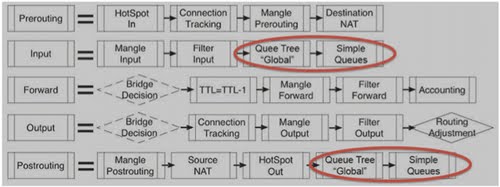
• Latest v6rc3 adds more Simple queue optimizations, Packet flow is slightly changed as you can see in the diagram below
• v6 also features fastpath feature - a mechanism of packet flow shortcuts to massively improve data throughput, currently this feature is added to simple setups, like routing, bridging and mpls, but in future we plan to enable fast path for more complex features, such as Firewall
• Fastpath is also supported for MPLS traffic since RouterOS v6rc3
• RouterOS is now made 64bit for TILE architecture, that is used on our new Cloud Core Router devices (see article on page 1), giving ability to use 16GB of RAM or more


Hidden Feature - Cable Diagnostics

The ability to detect cable problems has now been added in RouterOS v6rc3 and newer releases.
RouterOS will tell you:

    • Which cable pair is broken
    • At what length the cable is broken
    • How the cable is broken - torn or shorted
    
This works on SXT-G, RB711G, RB2011, RB750 series and other devices with the same switch chips, and also the new Cloud Core series devices.

Check us out at www.ispsupplies.com for all of your MikroTik needs!